In the second half of 2024, my organisation decided to move from AWS to Alibaba Cloud. This was a massive effort because thousands of microservices and databases had to be moved without any downtime. In this post, I will focus on the journey my team took to move a workload that used Redis as its core database. The hacks and the fun stuff.
The Architecture
Let’s go over the architecture in AWS. I will redact the exact service names to avoid revealing any internal details.
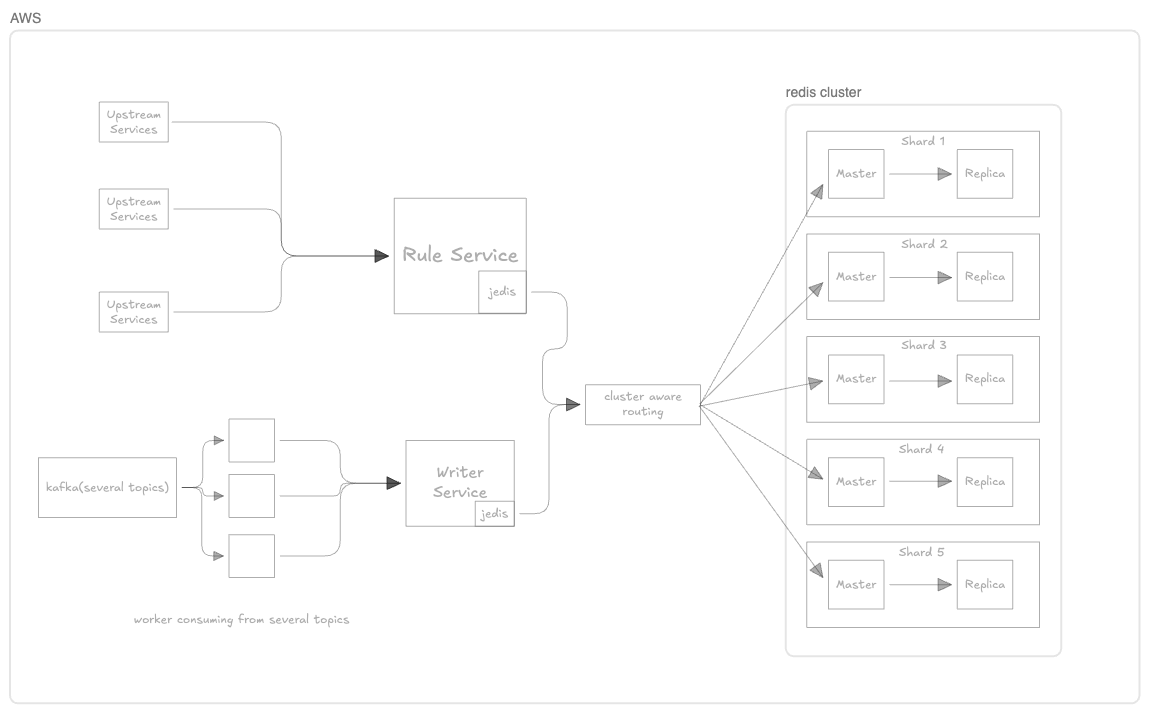
We avoided a backfill and created replicas because this service consumes almost 70 Kafka topics. None of them are owned by our team, which means we would have to wait for every team to migrate.
Challenges:
- Kafka topics are owned by multiple teams. We would have to wait for every team to migrate their Kafka producers to Alibaba Cloud.
- The upstream service calling the Rules Service has a tight SLA that would definitely break if it moved to the new cloud before us.
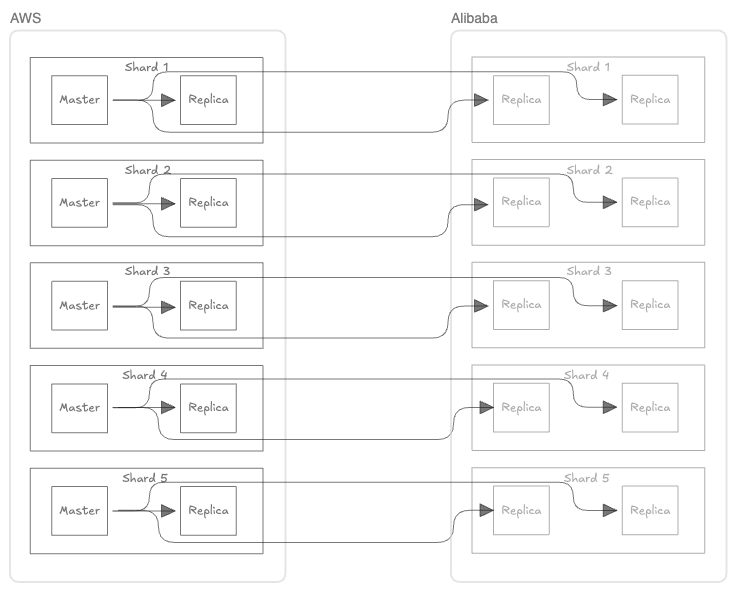
After creating Redis replicas in the new cloud for the existing masters, the Redis architecture would look like this:
The Latency Problem
The Rules Service is now deployed in Alibaba Cloud, but the Redis masters are still sitting in AWS. So when an upstream service calls the Rules Service in Alibaba Cloud, it still hits the Redis masters in AWS. The regions are completely different, and each request makes almost 50 to 100 Redis calls. We have just moved the network hop to a place where it is an even bigger bottleneck.
We cannot simply enable replica reads because Jedis is not cloud-aware and can choose a replica in either cloud.
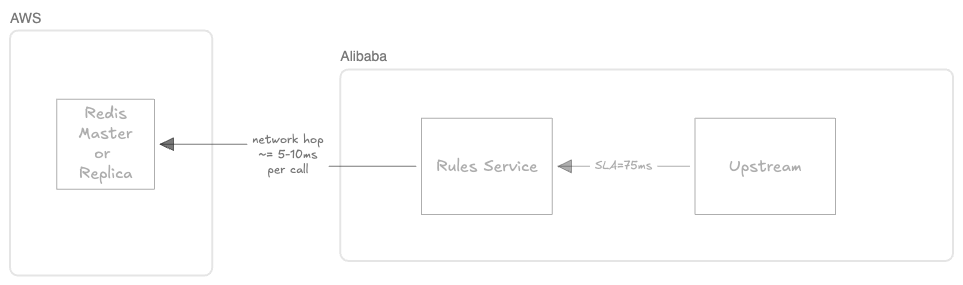
The SLA for some upstream callers is as low as 75 ms, and we got it increased to 100 ms. Each cross-region, cross-cloud Redis call adds roughly 5 to 10 ms. Because the 50 to 100 calls run in parallel (Clojure baby!), that cost is not simply multiplied by the number of calls. Instead, request latency is governed by the slowest call (or by the slowest wave when the connection pool limits concurrency) because the service waits for every read before returning a judgment.
The Big Solution
Instead of letting Jedis choose the master or any available replica for a slot, we wanted to control reads based on where the service and Redis nodes were running.
Before going further, let me explain how the Jedis client maps a key to a slot and discovers the master for that slot.
Quick refresher on Jedis and Cluster slots
Jedis gets a list of configured seed nodes. It connects to one of them and asks for the cluster topology using:
CLUSTER SLOTS
If the request fails, Jedis tries the other configured nodes until it can discover the topology. Redis returns the slot ranges together with the address of the master for each range and, when available, its replicas.
The response is a nested RESP2 array. For clarity, let us look at one shard from a five-shard cluster. This example has one master and one replica:
*5            ---> five slot-range entries (one per shard in this example)
*4            ---> this shard entry has 4 items
:0            ---> start of the slot range
:3276         ---> end of the slot range
*3            ---> master entry has 3 items
$9            ---> master host is 9 text length
10.0.0.11     ---> master host
:6379         ---> master port
$40           ---> master node ID length
m111...       ---> master node ID
*3            ---> replica entry has 3 items
$9            ---> replica host length
10.1.0.11     ---> replica host
:6379         ---> replica port
$40           ---> replica node ID length
r111...       ---> replica node ID
...rest of the nodes here
Jedis stores the topology in JedisClusterInfoCache. It uses arrays with 16,384 entries, one for every slot, and maps each entry to a connection pool:
private final ConnectionPool[] slots;
private final List<ConnectionPool>[] replicaSlots;
There is one entry for every Redis Cluster hash slot (0–16383). If Redis reports that slots 6554–9830 belong to Master 3, Jedis assigns Master 3’s connection pool to every corresponding array entry:
slots[6554] → ConnectionPool(Master 3)
slots[6555] → ConnectionPool(Master 3)
slots[6556] → ConnectionPool(Master 3)
.
.
.
slots[9830] → ConnectionPool(Master 3)
For user:123, Jedis calculates:
CRC16("user:123") % 16384 = 12893
It then performs a constant-time lookup:
slots[12893] → ConnectionPool(Master 3)
Jedis also keeps the node address in a HostAndPort[] array and, when replica reads are enabled, maintains a list of replica pools for each slot. If the cached topology is stale, Redis returns a MOVED response; Jedis refreshes the cache and retries the command.
Now that we know how Jedis finds the slot for a given ID, let’s see how we can use this mechanism.
Let’s map the Redis response for CLUSTER SLOTS to a single shard with four nodes: one master and three replicas.
*4                         ---> this shard entry has 4 items
:0                         ---> start of the slot range
:3276                      ---> end of the slot range
*3                         ---> master entry has 3 items
$9                         ---> master host is 9 text length
10.0.0.11                  ---> master host
:6379                      ---> master port
$40                        ---> master node ID length
m111...                    ---> master node ID
*3                         ---> replica entry has 3 items
$9                         ---> replica host length
10.0.0.12                  ---> replica host
:6379                      ---> replica port
$40                        ---> replica node ID length
r111...                    ---> replica node ID
*3                         ---> replica entry has 3 items
$10                        ---> replica host length
192.1.0.11                 ---> replica host
:6379                      ---> replica port
$40                        ---> replica node ID length
r121...                    ---> replica node ID
*3                         ---> replica entry has 3 items
$10                        ---> replica host length
192.1.0.12                 ---> replica host
:6379                      ---> replica port
$40                        ---> replica node ID length
r131...                    ---> replica node ID
Let’s say we have two nodes in AWS and two in Alibaba Cloud. We can identify them using their IP prefixes: 10.0.0 is AWS and 192.1.0 is Alibaba Cloud.
Create a new variable to hold our data structure:
private final TreeSet<ConnectionPool>[] cloudAwareSlots;
For each shard, we place local nodes before cross-cloud nodes while also considering their roles. On every topology refresh, the master is placed first within its cloud, making failover seamless.
either local replica or local master
local replica 2
cross-cloud master/replica
cross-cloud replica
The Full Picture
The write path remains unchanged and continues to use Jedis’s existing slots[] mapping. The new cloudAwareSlots[] structure is used only for reads.
READ path
flowchart TB
    refresh["Topology refresh"] -->|"CLUSTER SLOTS"| response["Slot ranges\nmaster + replicas"]
    response --> candidatesByShard["Build one ordered candidate set per shard\nlocal nodes first, then cross-cloud nodes"]
    candidatesByShard --> cloudMap["cloudAwareSlots[]\n16,384 slot references\nshared candidate sets"]

    service["Rules service\nJedis client"] --> read["READ\nGET user:123"]
    read --> hash["CRC16(key) % 16,384\nslot = 12,893"]
    hash --> cloudMap
    cloudMap --> candidates["Candidate set for slot 12,893"]
    candidates --> attempt["Try candidates\nin priority order"]

    attempt -->|"current topology"| localReplica["Alibaba replica\nREADONLY connection"]
    attempt -->|"after promotion"| localMaster["Alibaba master"]
    attempt -.->|"candidate unavailable"| fallback["Next candidate\nmay be cross-cloud"]
    fallback -.-> attempt

    localReplica --> result["READ result"]
    localMaster --> result

    stale["MOVED 12893 host:port\nstale slot mapping"] --> refresh

    classDef service fill:#2563eb,color:#fff,stroke:#1e3a8a,stroke-width:2px;
    classDef mapping fill:#ede9fe,color:#1e1e1e,stroke:#7c3aed,stroke-width:2px;
    classDef master fill:#fee2e2,color:#1e1e1e,stroke:#dc2626,stroke-width:2px;
    classDef replica fill:#dcfce7,color:#1e1e1e,stroke:#16a34a,stroke-width:2px;

    class service service;
    class candidatesByShard,cloudMap,candidates,attempt mapping;
    class localMaster master;
    class localReplica replica;
Reads now go to a local replica or master. This works in both AWS and Alibaba Cloud because the switch can happen in either direction. It saved us a massive amount of time and avoided a more complex architecture.
Tradeoffs and Mistakes
- Missing the master placement: The initial change didn’t factor in the fact that the master can go from one cloud to another. During testing, we figured out the traffic started hitting the other cloud when the only replica in the current cloud went down.
- Non-contiguous ranges: Our production Redis cluster had non-contiguous ranges such as
1-3096,4078for the same shard. The cloud-aware slot mapping didn’t account for this and caused a startup failure. Since this happened during the initial deployment, we found and fixed it immediately. - Creating a
TreeSetblew up memory: The initial version created aTreeSetfor every slot entry. Memory usage shot up, and topology refreshes started taking longer. The solution was to create oneTreeSetper shard and reference it in each slot. This is a programmer 101 mistake :_) - Stale reads: Redis defaults to master reads because replica reads can go stale when replication lags. The chances of this happening are usually low, but they increase when replication crosses clouds and multiple network hops. For this service, it was an acceptable tradeoff.
- Cross-cloud timeouts: Cross-cloud latency triggered false node-failure detection, so we increased
cluster-node-timeoutfrom 5,000 ms to 15,000 ms. The tradeoff was that genuine failures would take longer to detect. - Write latency: Writes still went to the current master, even when it was in the other cloud. We accepted the additional latency because reads dominated the workload.
- Network availability: During a connectivity failure, having the master in one cloud causes a network partition, and writes will not reach the other cloud. We accepted this temporary limitation during the migration.
One obstacle was that Jedis did not provide an extension point. Its exposed interfaces do not let you change how cluster slots and connections are created. To work around this, I used this constructor marked @VisibleForTesting.
Final Notes and Cutoff
Everything was in place, and it was time to start receiving traffic in the fancy new cloud. We gave the upstream services the go-ahead to switch their read traffic. It started hitting the new Redis nodes at full force.
This whole activity made the write migration easy. Since each read path can depend on multiple write events, it would have been harder to map every write path before moving the read path. Now we could start a worker in the new cloud, wait for Kafka lag to settle down, and then stop the old worker. Every write was idempotent based on the key and event timestamp, which meant that when two workers wrote the same data, we got the same final state, making it safe.
On one auspicious day, just a week before the deadline, all the engineers on the team gathered and started switching almost 30 workers to the new cloud. It was exhausting but satisfying as we reached the finish line.
Once that was done, we disabled automatic failover and started switching the masters to the new cloud. The service was unaffected, as expected. We observed it for a couple of days to see if there was any weird behaviour. Since there was none, the replica nodes in AWS were first disconnected from the shard and then decommissioned altogether.
The takeaway from this exercise is that it is okay to take an unconventional path if it produces the desired result.
P.S. Please send feedback if you have any, or if you think there could have been a better approach. You can find my email here: [email protected].